Snowball Rivals
(5/28/26 UPDATE) Changes include...
- The volume being lowered.
- The option to change the volume of the sounds and music separately.
- Scoreboard in the settings for both players
- A pause menu with a new music track.
- Pausing and unpausing has a new sound effect.
- Notification of the time remaining alongside a new warning sound effect.
- Changing the snowball gathering sprites and Player 1's losing sprite.
- Computer players will try to avoid a snowball being thrown at them.
- The hitboxes of players have been changed.
- Player 2's invisibility frames have been fixed.
Some of these are explained in more detail below.
Backstory
These two have always had a petty rivalry. Winter has come and they want to see who can win a snowball fight.
Controls
Escape Key- Pause Game (Battle)
(Player 1) Boy That Wears Brown
A Key - Move Left (Battle) / Adjust Left (Settings and Pause Menu)
D Key - Move Right (Battle) / Adjust Right (Settings and Pause Menu)
W Key- Move Up (Battle) / Navigate Up (Settings and Pause Menu)
S Key - Move Down (Battle) / Navigate Down (Settings and Pause Menu)
Space Key - Gather snow (Battle) / Throw Snowballs (Battle) / Select Option (Settings and Pause Menu)
(Player 2) Boy That Wear Blue
Left Arrow Key - Move Left (Battle) / Adjust Left (Settings and Pause Menu)
Right Arrow Key - Move Right (Battle) / Adjust Right (Settings and Pause Menu)
Up Arrow Key- Move Up (Battle) / Navigate Up (Settings and Pause Menu)
Down Arrow Key - Move Down (Battle) / Navigate Down (Settings and Pause Menu)
Enter Key - Gather snow (Battle) / Throw Snowballs (Battle) / Select Option (Settings and Pause Menu)
Settings
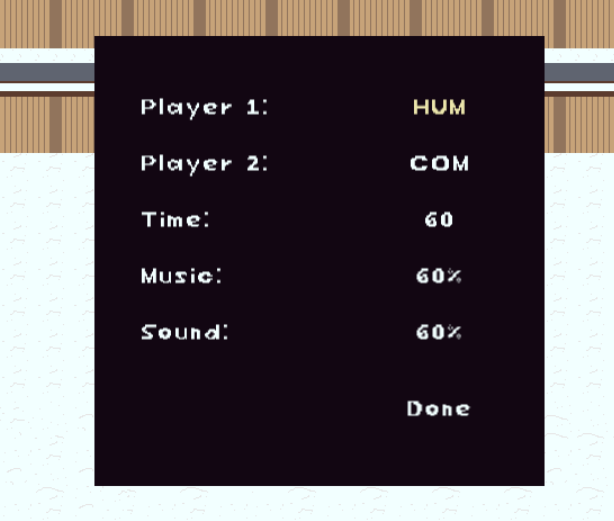
Before the snowball battle begins, you can adjust the settings. 'Player 1' and 'Player 2' will let you determine who is controller who by choosing between 'HUM' and 'COM'. 'HUM' means that the player will be controlled by a human and 'COM' means that the player will be controlled by the computer. 'Time' will determine how long the match will be in seconds. You can choose from 30, 60, 90, and 120. 'Music' and 'Sound' controls how loud the music and sound effects are respectively. Select 'Done' when the settings are to your liking.
The settings are not saved for later sessions so they cannot be carried over once you close the webpage.
Scoreboard

Each player has a scoreboard above the settings menu. The left brown box represents player 1 and the right blue box represents player 2. 'HUM' next to the player's name indicates that a human was playing as them while 'COM' indicates that the computer was playing as them. 'Games Won' displays how many matches a player won and 'Triple Strikes' displays how many times the player has defeated the other player by giving them three strikes. The stats are updated after a match is finished. The scoreboard is restarted if at least one of the players is changed to be controlled differently and the next match finishes.
The scoreboards are not saved for later sessions so they cannot be carried over once you close the webpage.
Gameplay
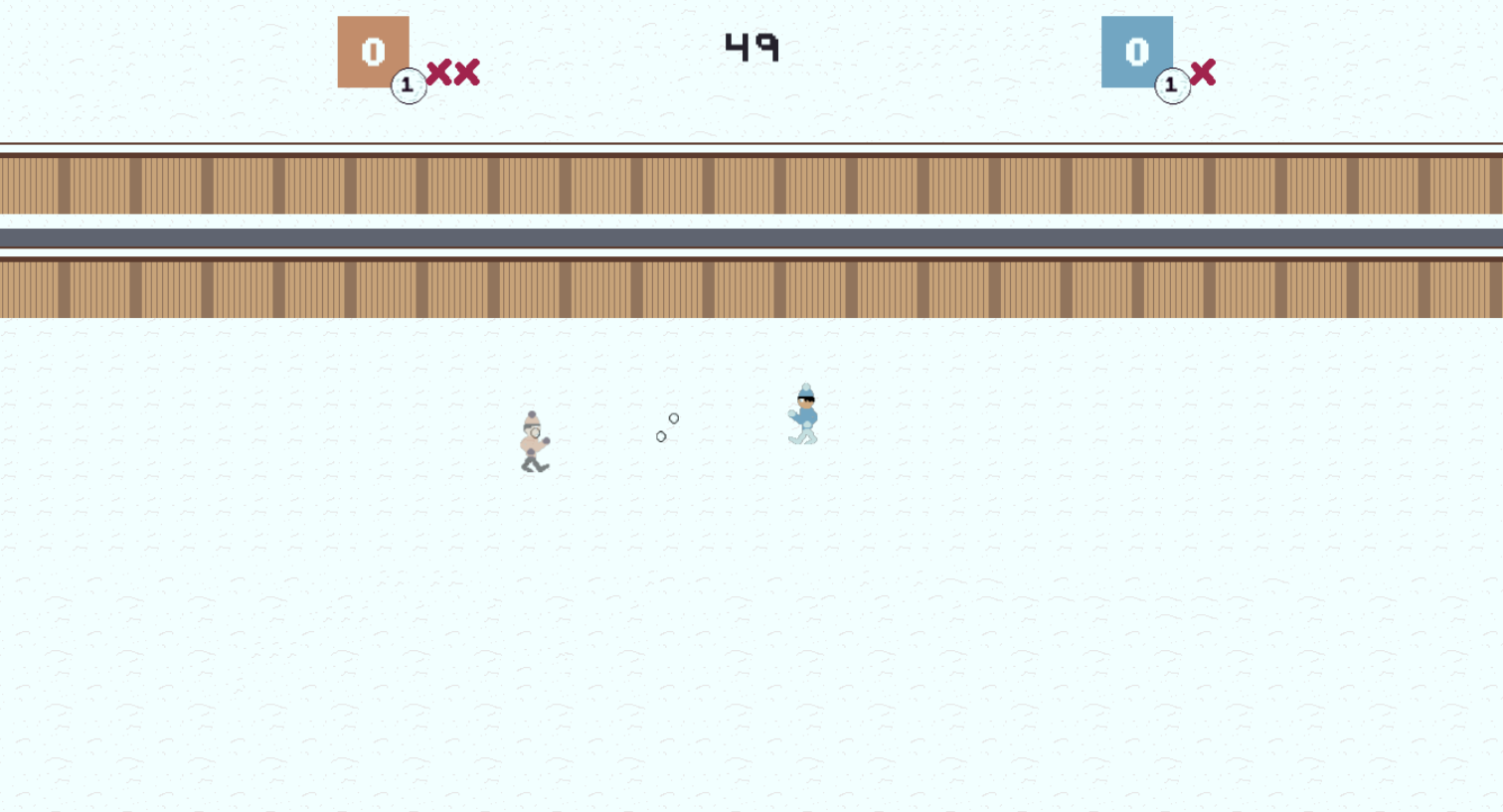
When the match begins, players have to gather snow before they can throw snowballs. Player 1 is the boy that wears brown clothing while Player 2 is the boy that wears blue. Once the snow has been gathered, the players throw snowballs at each other. The players can throw up to five snowballs. If all of them have been thrown, the player must gather the snowballs again.
If a snowball lands on a player, they earn a strike. Once they get three strikes, they are defeated and have to respawn. The player who defeats them earns a point. Anytime the player is hit by a snowball or respawns will be temporarily invincible.

At the top of the screen, information is displayed, which includes the stats for each player and the timer. Player 1's stats are shown on the left represented with the brown icon, while Player 2's stats are represented on the right with the blue icon. Stats for the respective player that are displayed include the points they earned, the amount of snowballs the player's have (snowball with the number on it), and the number of strikes they gotten (the red xs). The timer at the center will count down. After thirty seconds, the game notifies the players how much time they have left with a text message at the center and a warning sound effect. The game will also notify the player if there's only ten seconds left.
Once time runs out, the winner is decided on who has the most points, however draws can happen. After a match, you will be taken back to the settings menu.
Pausing
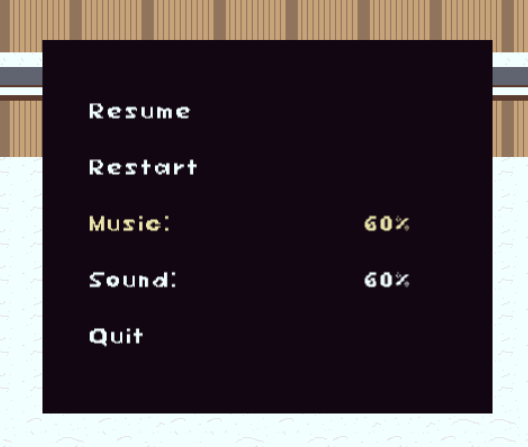
When you pause the game, a menu appears. Pressing the pause key or selecting 'Resume' will close the menu and continue the game. Selecting 'Restart', restarts the match. 'Music' and 'Sound' controls the volume like in the settings. 'Quit' returns to the settings menu ending the match. Quitting or restarting the match will prevent any changes made to the stats for each player.
Credits
This game was made for Comfy Jam: Winter.

Programmer, Artist, Game Designer
VirtualMini
Assets Used
Shoot_03.wav by LittleRobotSoundFactory -- https://freesound.org/s/270335/ -- License: Attribution 4.0 https://creativecommons.org/licenses/by/4.0/
Hit_03.wav by LittleRobotSoundFactory -- https://freesound.org/s/270332/ -- License: Attribution 4.0 https://creativecommons.org/licenses/by/4.0/
Retro video game sfx - Fail by Ashe Kirk -- https://freesound.org/s/404743/ -- License: Creative Commons 0 https://creativecommons.org/publicdomain/zero/1.0/
Game SFX - Victory Sound by hushless -- https://freesound.org/s/776041/ -- License: Creative Commons 0 https://creativecommons.org/publicdomain/zero/1.0/
Game Over Arcade by Mountain_Man -- https://freesound.org/s/382310/ -- License: Creative Commons 0 https://creativecommons.org/publicdomain/zero/1.0/
Retro Action Game Loop by ProdByRey -- https://freesound.org/s/715707/ -- License: Creative Commons 0 https://creativecommons.org/publicdomain/zero/1.0/
Blip_Select11 by MusicLegends -- https://freesound.org/s/344299/ -- License: Attribution 3.0 https://creativecommons.org/licenses/by/3.0/
menu click by Leszek_Szary -- https://freesound.org/s/171527/ -- License: Creative Commons 0 https://creativecommons.org/publicdomain/zero/1.0/
8 bit music loop 002 part 02 simple mix 07 short loop 120 bpm.wav by josefpres -- https://freesound.org/s/691957/ -- License: Creative Commons 0 https://creativecommons.org/publicdomain/zero/1.0/
SFX-Begin.wav by HenryRichard -- https://freesound.org/s/448261/ -- License: Creative Commons 0 https://creativecommons.org/publicdomain/zero/1.0/
pause.wav by jeckkech -- https://freesound.org/s/391664/ -- License: Creative Commons 0 https://creativecommons.org/publicdomain/zero/1.0/
Rivalry - 8 bit music loop by michorvath -- https://freesound.org/s/412344/ -- License: Creative Commons 0 https://creativecommons.org/publicdomain/zero/1.0/
8-Bit - Incoming enemy by Breviceps -- https://freesound.org/s/450615/ -- License: Creative Commons 0 https://creativecommons.org/publicdomain/zero/1.0/
WINTERCODE PALETTE by yedamameday https://lospec.com/palette-list/wintercode is used as the game's color palette although some colors might not be a part of it.
Special Thanks
Everyone who rated Snowball Rivals during the voting period.
The people who reviewed my game. Your feedback was helpful in improving it through the update.
Macrow for hosting Comfy Jam: Winter, giving me the opportunity to make this game.
Leave a comment
Log in with itch.io to leave a comment.