That's a Bird!
Controls
Mouse
Left Button = Used to press "Click to Start" (Only on first screen)
Keyboard
A Key = Used to change selection to the left
D Key = Used to change selection to the right
W Key = Used to change selection up (Only on settings screen)
S Key = Used to change selection down (Only on settings screen)
Enter Key = Used to go to settings, start the level, go to the next round or results screen, and enter in answers
Escape Key = Used to end the level early and go back to the settings without saving your progress (Only during a level, even up to the results screen)
Delete Key = Used to delete data (Only on first screen)
Recommended having a piece of paper and writing utensil to count the characters. Other alternatives can also work . If you want to go through the challenge of not using anything but your mind, go right ahead.
Settings
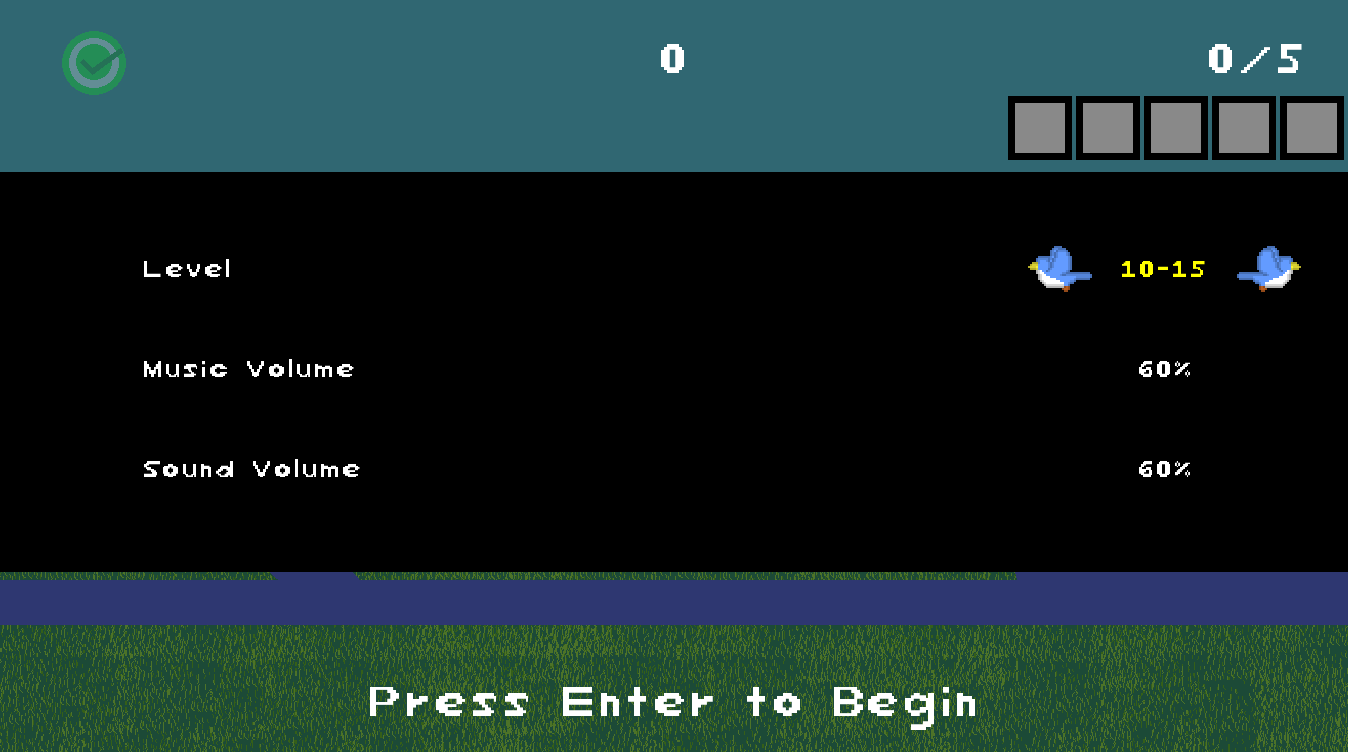
After pressing enter on the title screen, you will be on the settings screen. There are three options to change.
Level
Level is the level that you will be playing. There are six levels.
- 10-15
- 15-20
- 20-25
- 25-30
- 30-35
- Locked (Must be unlocked)
The numbers that indicate each mode is how many birds will likely appear in each round. For example, level 10-15, at minimum, 10 birds can appear in one round, while, at maximum, 15 birds can appear. This doesn't account for the possible addition of beavers and UFOS.
At the top of the screen, there are few things in the HUD that each mode has.
- The light green checkmark badge indicates that a level has been passed. If the level hasn't been played or the player doesn't get a passing fractional score, it will appear transparent.
- At the top center is the high score for each level. It gets updated if a new high score surpasses the original one. It doesn't take into account of the amount of questions that have been passed however the high score if surpassed can change the question pictures
- The fraction is the fractional score of the level. It accounts for the 5 questions the amount that was answered correctly. Questions that are considered close answers are not taken into account in the fractional score.
- The five empty frames are the question pictures. They are empty until the the level is played through and the level's score is updated. The frame and background will change and pictures of one or more characters will appear inside. The boxes will continue to change as the score gets updated. The pictures indicate the question that was asked and the frame color and background indicate how it was answered. Frame indicate how correct the answer while the background indicate how fast the question was answered. The question pictures are in the order of when they were asked during a level.
Here's what each frame and background of the question pictures indicate. The pictures inside the frames will be shown in the gameplay section.
| Picture of Frame | Status |
 | Question not recorded |
 | Question answered correctly |
 | Question answered almost correctly (one number off) |
 | Question answered almost correctly (two numbers off) |
 | Question answered incorrectly |
| Picture of Background | Status |
 | Question not recorded |
 | Question answered before the halfway point of the timer without being fully incorrect |
 | Question answered past the halfway point of the timer without being fully incorrect and without timer reaching 0 |
 | Question answered when timer is 0 without being fully incorrect |
| Question answered incorrectly |
Music Volume and Sound Volume
How loud the music and sound is can be changed in their respective options. In the option you are currently selecting, you use the 'A' key to decrease the volume and the 'D' key to increase it. At default, both of them are at 60%. Your volume settings are saved once you click begin, but to keep it once you close the game, you must play through at least one level. Otherwise it will reset back to default once you boot up the game again. Afterwards, you can change the volume settings, play a level, leave without finishing, and the new volume settings are still saved.
Once you decide on your settings, press enter to begin a level.
Gameplay
Press the escape button if you want to end the level early and head back to the settings screen. Progress in the level will not be saved when you do.
To pass a level, you must get at least win three rounds by answering each round's question correctly.
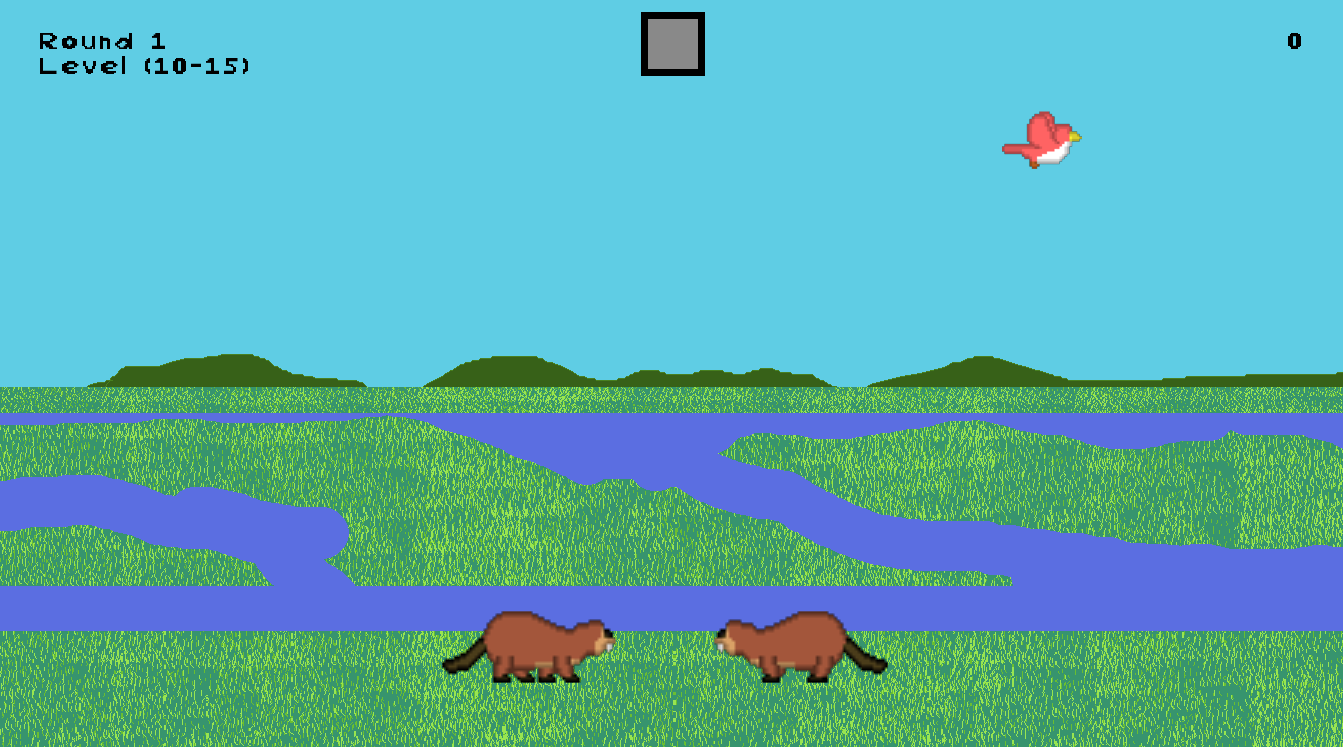
Watch Section
At the start of each round, characters will begin to appear, most of them being birds of a variety of colors. Some will appear from the left and others will appear from the right. They will move toward the opposite direction until they are off screen.
Birds can appear further away or closer to the screen, but this has no relevance to the questions that will be asked. Sometimes, birds can also move a lot slower than the other birds or even way faster. Birds can also sometimes fly down before flying back up, which is important for one possible question. The amount of birds that appear depend on the level that was selected. Level 10-15 means a round might have only 10 birds or up to 15.
Birds aren't the only characters that can appear. Beavers can also be walking on the ground too. UFOs can also appear in the sky too. For this game, they will be considered a character. Unlike the birds, they aren't affected by the level minimum's or maximum number of birds so there could be more than 15 characters in a round. With that said, UFOs are not going to appear if the chosen bird number of the round had been reached while beavers might appear a few more times.
During the watch section, you must count the amount of characters you see. For the birds, you should count the birds separately based on their feather colors.
The HUD shows info that, while not important to look at in the moment keeps track of your current progress.
- The top left part shows the current round number and the current level.
- The top center is the question picture. It's currently blank during the watch section and a picture won't be shown until no other character will appear.
- The top right is your current score.
Question Section
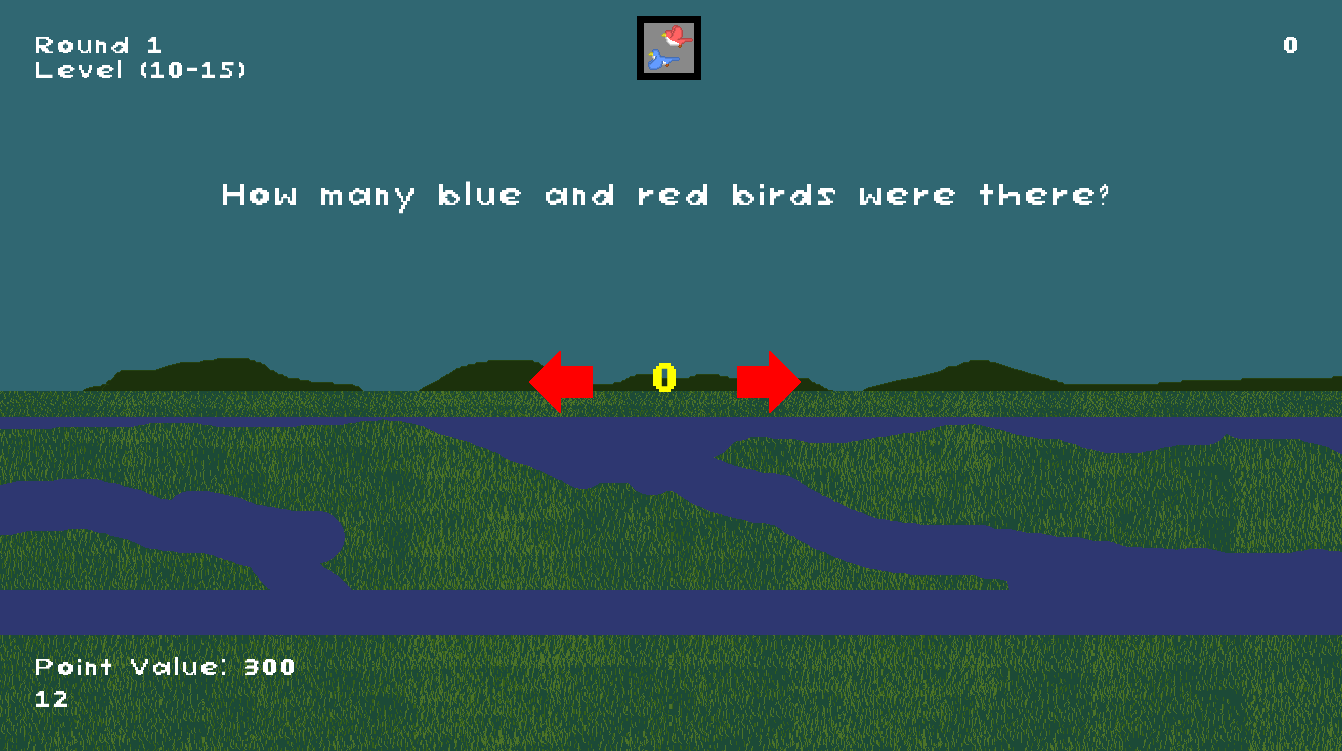
After the watch section, a question will appear. After three seconds, the ability to select your answer appears at the center of the screen. A timer will also begin counting down. The current point value of the question and the timer appear at the bottom left of the screen.
The timer is for how large the point value of the question is, which will be decreased as timer counts down. The maximum amount is 300 points and it will stay like that as long as the timer doesn't reach the half way point, which will make it 200 points. Once the timer stops, the point value will be 100 points, but the player can still answer the question.
The timer depends on the level.
- Level 10-15 (12 Seconds)
- Level 15-20 (14 Seconds)
- Level 20-25 (16 Seconds)
- Level 25-30 (18 Seconds)
- Level 30-35 (20 Seconds)
Here are all the possible questions.
| Question Picture | Question |
 | How many blue birds were there? |
 | How many red birds were there? |
 | How many green birds were there? |
 | How many birds were there? |
 | How many beavers were there? |
 | How many UFOs were there? |
 | How many nonbirds were there? |
 | How many characters were there? |
 | How many birds flew down? |
 | How many blue and red birds were there? |
 | How many red and green birds were there? |
 | How many blue and green birds were there? |
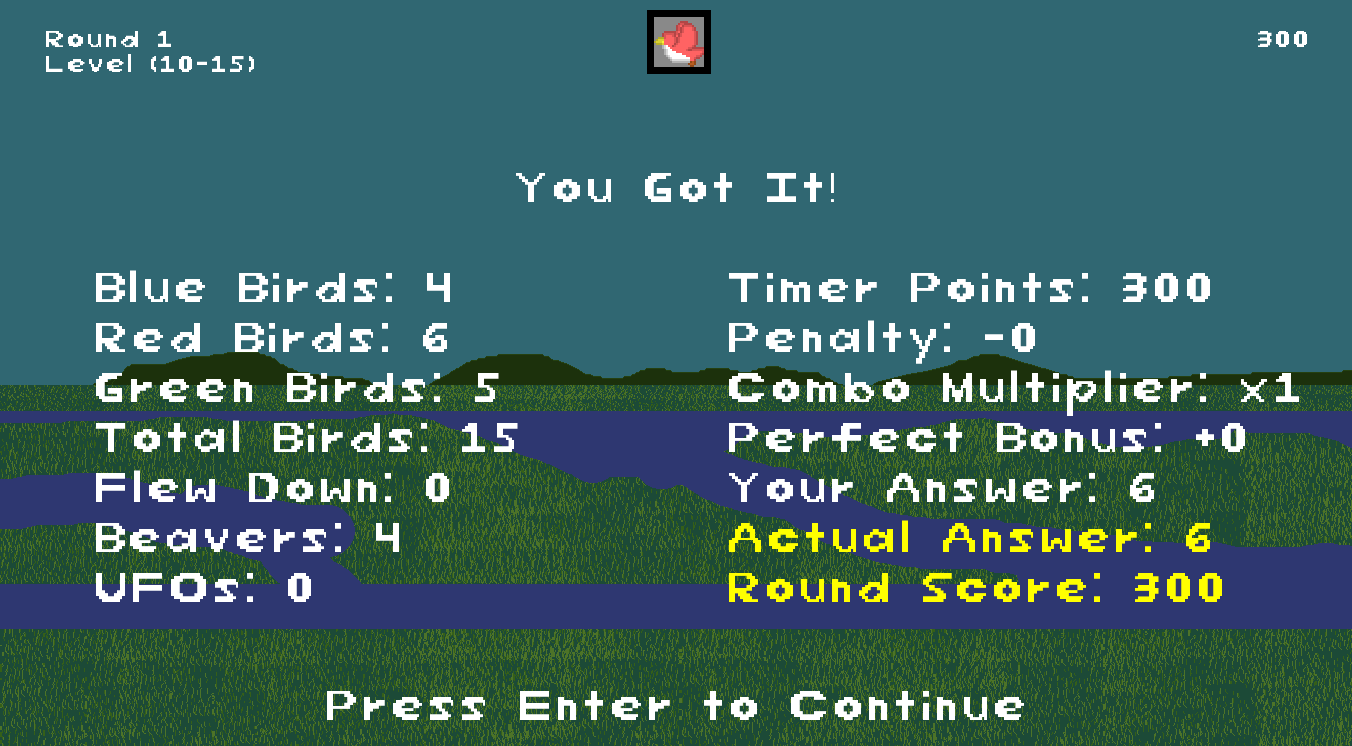
After answering the question, you will be taken to a screen where the game tells you if you were right, close, or wrong. It also shows stats for the current round.
If your right, you will get the timer points, which is the point value of the question you answered. It can be 300, 200, or 100 depending on how fast you answer the question.
If your close, which is one number or two numbers off, you will get a penalty, but still get partial points. An answer that is one number off gets a 25% point reduction of the timer points while an answer that is two numbers off gets a 50% point reduction.
If your wrong, no points will be rewarded.
During the next round, if you get the correct answer, the combo multiplier will increase by 1, multiplying the timer points of that round. So instead of you possibly earning 300 points, you will get 600 points if that was your timer points. You can increase it up to 5, meaning if you correctly answer all 5 rounds, the fifth round's timer points will be multiplied by 5. If you are only close to the answer or you made an incorrect one, the combo multiplier resets back to 1 and if your answer is only close to the real one, the points you earn will only be the timer points minus the penalty.
If you get every question correct, you will earn a Perfect Bonus, which is 1000 points. It is not affected by the combo multiplier though.
Next Round
After seeing your stats, pressing enter will take you to the next round, at least if you weren't on the fifth round yet. The characters will begin to move faster after every round.
Results Section
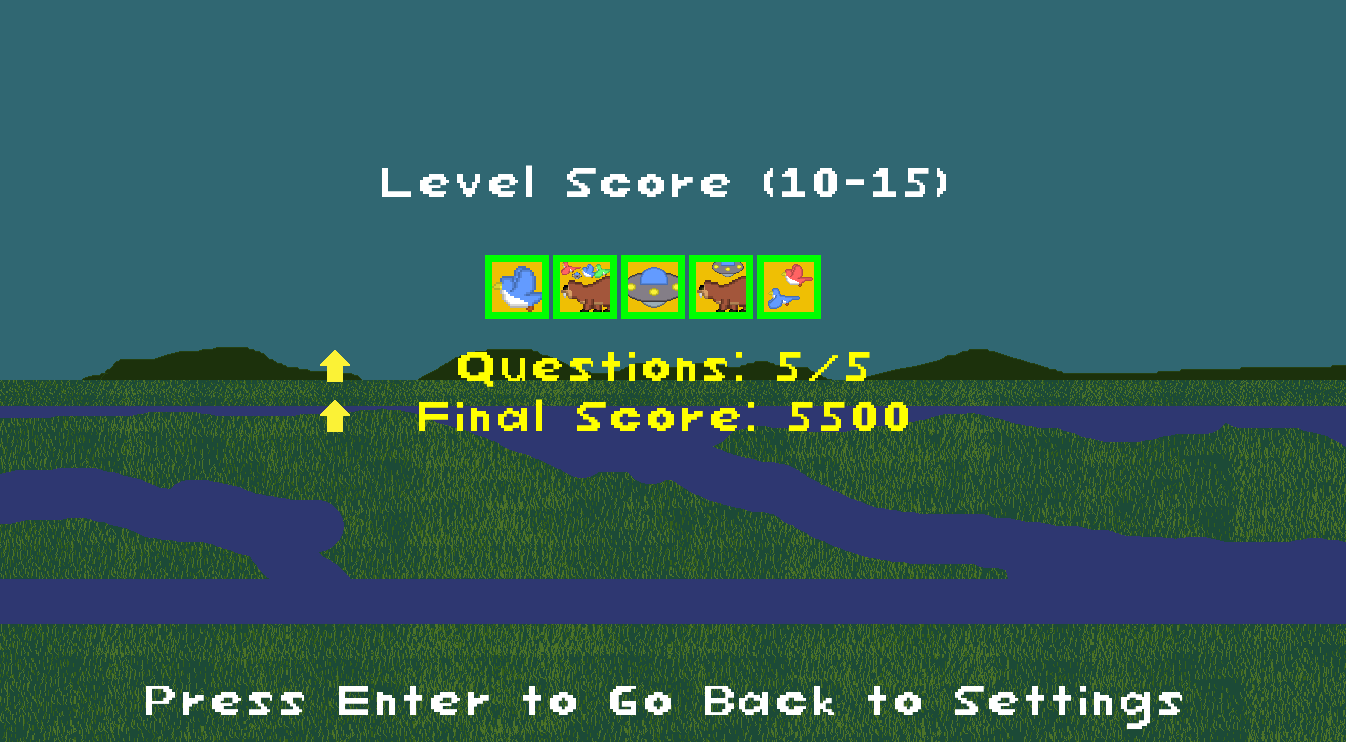
Once the fifth question is answered, you will be taken to the results screen, meaning the level is over. It will show all the questions you answered and how you did with them, your fractional score, and your final score. The yellow arrows indicate if you got a new high score.
Characters
 | Blue Bird |
 | Red Bird |
 | Green Bird |
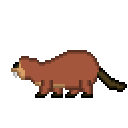 | Beaver |
 | UFO |
Secret Birds
There are actually secret birds in this game that have different color feathers. Most of them are in the locked mode, however they won't appear unless certain conditions are met. Once they do, a sound effect will play and points will be given to you based on the bird that appears. They will still factor into the questions being asked. There's also one bird that can appear somewhere else in the game.
Credits
Programmer, Artist, Game Designer
VirtualMini
Assets Used
Salt Marsh Morning Birds by itinerantmonk108 -- https://freesound.org/s/684147/ -- License: Creative Commons 0 https://creativecommons.org/publicdomain/zero/1.0/
home menu (Music Loop, 128bpm, G major) by vibritherabjit123 -- https://freesound.org/s/862252/ -- License: Attribution 4.0 https://creativecommons.org/licenses/by/4.0/
chill tune for a game.wav by Xythe -- https://freesound.org/s/516912/ -- License: Attribution 4.0 https://creativecommons.org/licenses/by/4.0/
GoodResult.wav by unadamlar -- https://freesound.org/s/341985/ -- License: Creative Commons 0 https://creativecommons.org/publicdomain/zero/1.0/
Menu Background Music by Sunsai -- https://freesound.org/s/415805/ -- License: Attribution 4.0 https://creativecommons.org/licenses/by/4.0/
8 bit loop by chocofactory -- https://freesound.org/s/699689/ -- License: Creative Commons 0 https://creativecommons.org/publicdomain/zero/1.0/
saving progress (Music Loop, 128bpm, G major) by vibritherabjit123 -- https://freesound.org/s/862253/ -- License: Attribution 4.0 https://creativecommons.org/licenses/by/4.0/
Button Beep by BloodPixelHero -- https://freesound.org/s/576983/ -- License: Creative Commons 0 https://creativecommons.org/publicdomain/zero/1.0/
button by Leszek Szary -- https://freesound.org/s/171521/ -- License: Creative Commons 0 https://creativecommons.org/publicdomain/zero/1.0/
bird_flapping_7.wav by Clusman -- https://freesound.org/s/543115/ -- License: Creative Commons 0 https://creativecommons.org/publicdomain/zero/1.0/
bird_flapping_2.wav by Clusman -- https://freesound.org/s/543114/ -- License: Creative Commons 0 https://creativecommons.org/publicdomain/zero/1.0/
bird_flapping_9.wav by Clusman -- https://freesound.org/s/543117/ -- License: Creative Commons 0 https://creativecommons.org/publicdomain/zero/1.0/
bird_flapping_3.wav by Clusman -- https://freesound.org/s/543113/ -- License: Creative Commons 0 https://creativecommons.org/publicdomain/zero/1.0/
80sUFO.wav by Nerdwizard78 -- https://freesound.org/s/646597/ -- License: Creative Commons 0 https://creativecommons.org/publicdomain/zero/1.0/
water step.wav by nathanaelj83 -- https://freesound.org/s/145242/ -- License: Creative Commons 0 https://creativecommons.org/publicdomain/zero/1.0/
8-bit Correct Answer by JapanYoshiTheGamer -- https://freesound.org/s/361263/ -- License: Creative Commons 0 https://creativecommons.org/publicdomain/zero/1.0/
correct.wav by StavSounds -- https://freesound.org/s/546084/ -- License: Creative Commons 0 https://creativecommons.org/publicdomain/zero/1.0/
Wrong Buzzer by KevinVG207 -- https://freesound.org/s/331912/ -- License: Creative Commons 0 https://creativecommons.org/publicdomain/zero/1.0/
Strong Select/ Level Up Sound by ImATaco -- https://freesound.org/s/674208/ -- License: Creative Commons 0 https://creativecommons.org/publicdomain/zero/1.0/
Leave a comment
Log in with itch.io to leave a comment.